01
Plan a Continuing Story
Develop an overall story direction and organize the events that connect one episode to the next. Establish the series premise and decide how the main conflict changes from episode to episode.
One Story World. Multiple Connected Episodes.
Create an AI drama series from an idea, script, or novel. Plan episode outlines, develop recurring characters, reuse locations and props, and keep the story connected as you produce one episode after another.
An AI drama series generator helps creators plan and produce multiple connected drama episodes from a shared story concept. Instead of beginning every video with an isolated prompt, it organizes episode outlines, recurring story assets, and scene production around the same fictional world.
With Topview, you can review the story direction, build episode-level plans, keep characters, locations, and props available for reuse, and develop video scenes with an editable workflow. Each episode remains a creative decision—not an automatically completed season.
01
Develop an overall story direction and organize the events that connect one episode to the next. Establish the series premise and decide how the main conflict changes from episode to episode.
02
Keep character descriptions, visual references, locations, and important props available throughout the project.
03
Review scripts and storyboards, generate video scenes, and refine production versions as your series develops.
Workflow
Start with one story world and plan how it grows across episodes. These five steps provide a practical route from the premise to reviewable production work. See also how to make an AI drama video.
01
Describe the genre, central question, main characters, and rules of the world. Start from an original idea, a script, or novel material.
02
Identify what changes in each episode, what the characters learn, and which unresolved questions carry forward. Review the plan before developing every scene.
03
Create or review records for key characters, locations, and props. Use these references to make later scenes recognizable as part of the same series.
04
Work from the series outline into each episode's scenes, dialogue with lip sync, shot directions, and visual plan. Check the previous episode's consequences before continuing.
05
Use the production workspace to review prompts, available references, and generated video versions. Continue episode by episode, checking both visual results and story continuity.
The preview is a product workflow recording, not a finished drama example.
Series bible
A series bible is a creative reference for the world of a continuing drama. It records the premise, character relationships, important places, recurring objects, and unresolved story questions so later episodes have a shared foundation.
You can organize these elements using editable outlines and story-asset records in the current workflow. It helps creators make decisions across episodes without reinventing the world each time.
Define what the show is about, where it takes place, and which rules shape the story. Write one sentence explaining the show's central conflict. Record what is possible in the world and which facts cannot change without a story reason. A clear premise gives individual episodes a shared direction.
Record each lead's appearance, goals, secrets, loyalties, and relationships. Update motivations when the plot changes them. Use editable character records and visual references to guide subsequent production.
Identify important settings and objects that appear throughout the series, especially those involved in ongoing plot threads. Keep their descriptions and reference assets available when planning new scenes.
Map the central conflict across the planned episodes. Track revelations, major expected turns, unresolved questions, and character decisions that later episodes need to address.
Review important facts before producing the next episode: what each character knows, which events have happened, and what must remain visually recognizable.
Planning tip: treat the series bible as a living editorial reference, not as an automatic continuity guarantee.
Episode arcs
An episode arc gives each installment a purpose. A series arc gives the whole story direction. The strongest connection is cause and effect: what happens in Episode 01 changes the choices available in Episode 02.
A discovery, failed plan, shifting alliance, or new obstacle should move the larger conflict forward.
A character shouldn't react to a secret before learning it. Keep significant revelations and decisions visible when preparing the next script.
A cliffhanger can reveal a hidden identity, interrupt a decisive choice, or introduce a threat. The following episode should address that turn, not ignore it.
Begin with the consequences of the earlier ending, then open a new conflict. Continuity is a narrative relationship, not only a matching costume or face.
What makes an AI drama series different from a collection of standalone videos?
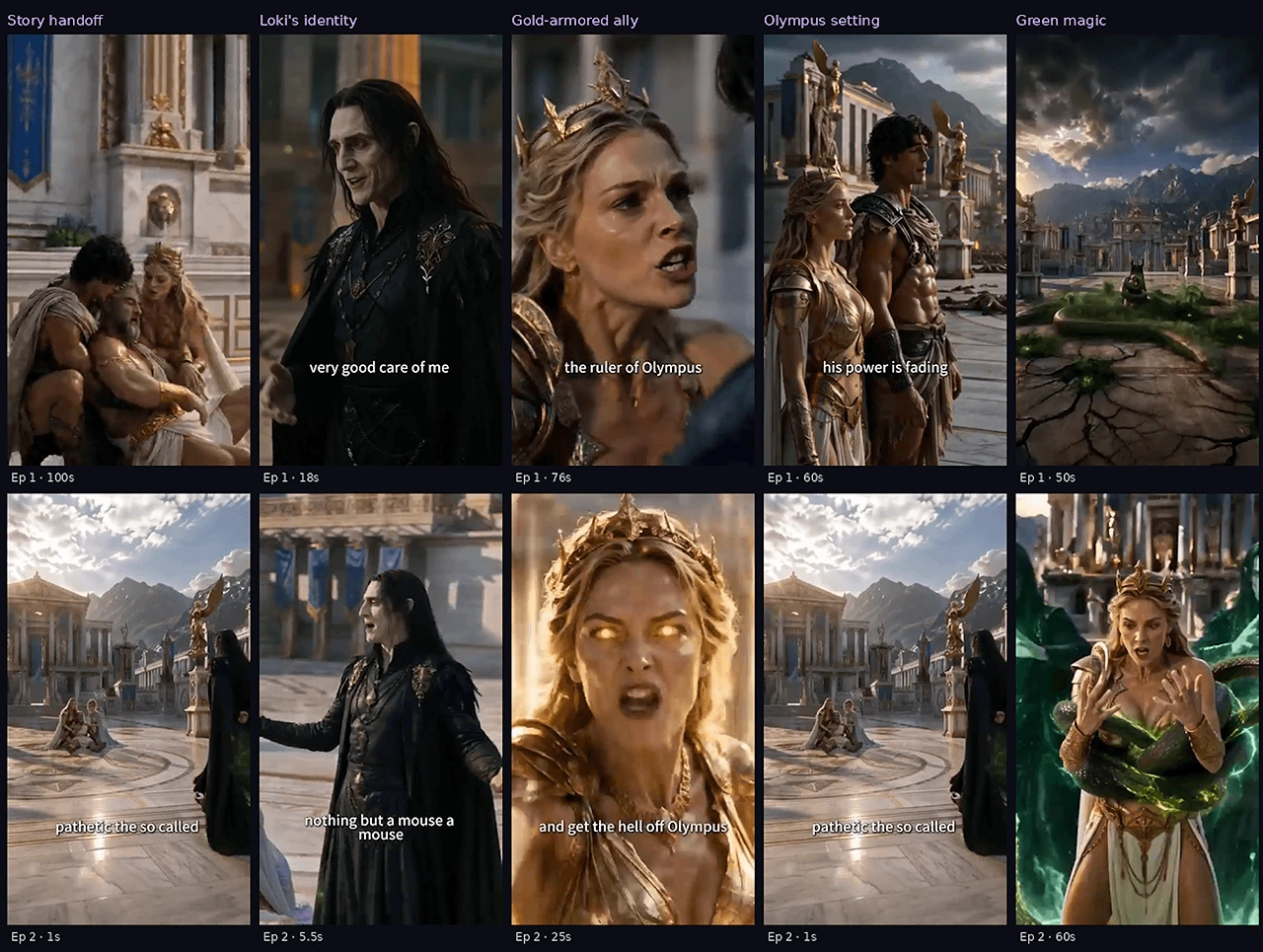
A connected series carries characters, settings, conflicts, and consequences from one episode into the next. These two fantasy drama episodes follow the battle between Zeus and Loki on Olympus. The first episode ends with Zeus defeated. The second continues from his fall as another defender steps forward—and faces a new threat. Explore how the videos maintain recognizable characters, a shared visual world, recurring magical effects, and an escalating storyline.
Format: 9:16 Vertical Drama
Duration: Approximately 1 minute 42 seconds
Format: 9:16 Vertical Drama
Duration: Approximately 1 minute 6 seconds
Story Summary
On Olympus, Zeus confronts Loki in a battle of divine powers.
Zeus unleashes lightning while Loki responds with dark green magic. Their confrontation tears through the temple courtyard, leaving the once-grand setting damaged by the conflict.
Other characters witness the struggle, including a young armored man and a blonde woman wearing golden armor.
As the battle unfolds, Zeus is overwhelmed. The episode ends with the wounded ruler of Olympus being supported by his companions.
Story Summary
The second episode continues from the aftermath of Zeus's defeat.
Loki stands before the wounded Zeus and mocks the fallen ruler of Olympus.
The blonde, gold-armored woman who appeared in the first episode now takes a leading role. She confronts Loki and unleashes radiant golden power in an attempt to drive him away.
Their battle continues across the same mythological setting.
Loki retaliates with green magical energy and serpent-like restraints. As the confrontation intensifies, the defender becomes trapped, and Loki gains the upper hand.
The episode ends with her in immediate danger, leaving the conflict unresolved.
The Episode's Key Story Elements
The episode establishes the characters, the opposing powers, and the stakes that will carry into the next installment.
The Episode's Key Story Elements
Episode 02 does not restart the story. It builds on the consequences of Episode 01 and gives the audience a new reason to continue watching.
Consistency
AI drama character consistency starts with clear visual references and deliberate review. Reusing the same character information can help guide new scenes, but generative video may still vary between shots.
Review appearance, hairstyle, signature clothing, and other recognizable features. Keep the approved character images and descriptions with the project.
A character can change clothes, hairstyle, or emotional expression as the story develops. What matters is that those changes belong to the narrative instead of happening by accident.
Bring the relevant character and scene references into the production workspace when generating new footage.
Compare generated scenes against the approved character references. If a shot changes an important visual detail, adjust the prompt or reference and review another version.
Reusable references help guide consistency, but they do not guarantee identical faces, voices, clothing, or motion across every generated shot. AI-generated results still require creative review.
World continuity
A connected series needs more than recurring faces. Recurring locations, important objects, and established story facts help the audience understand that each new episode belongs to the same world.
Suggested pre-episode review: returning cast · important locations · recurring props · character knowledge · unanswered plot threads.
A returning apartment, palace, classroom, or street should feel like the same place when the story revisits it. Keep visual references for key interiors and exteriors. Review their layout, lighting direction, and recognizable elements when returning to them.
A key, photograph, weapon, notebook, or family heirloom may become a plot device. Keep its appearance and narrative meaning aligned across scenes. A recurring prop can connect scenes and become part of a larger mystery.
Before writing or producing a new episode, check who knows what, which promises have been made, what has changed, and what remains unresolved.
Real product evidence
The live product workflow shows how a story moves through project setup, agent planning, editable workbench data, character preparation, and the handoff into production.
Multi-episode project setup
Choose a series direction and review the project settings before planning individual scenes.
Structured story planning
Use the AI agent and editable workbench to develop outlines, episodes, scripts, and story assets. Review the story structure and proposed episode work instead of leaving all decisions inside a chat transcript.
Character, location, and prop references
Review recurring project records and the references that support visual continuity. Keep project references available when you develop new episodes.
Scene production and version review
Examine prompts, production references, and generated scene versions as you work through the project.
Episode production
Once the outline and references are reviewed, develop each episode's scenes in context. Scripts, storyboards, prompts, and production assets give your next scene a starting point.
Check the episode script, storyboards, character references, and important scene details. Confirm the dramatic purpose, required props, and prior events that affect the scene.
Test different prompts and review different results for a scene and refine the direction when needed. Production versions allow you to evaluate creative alternatives instead of treating the first generated result as final.
Return to the planned arc and existing references, then continue with the next scenes. Review each result for visual and narrative continuity.
Series workflow
A drama series benefits from shared planning and reusable story assets before scene generation begins.
Swipe sideways to compare all columns on smaller screens.
Source material
Yes. A novel, serialized web-fiction story, or screenplay can serve as the basis for a multi-episode AI drama. Adaptation works best when you organize the source into episode-sized conflicts while preserving the larger narrative.
Determine the central conflict, long-term goal, turning points, and the major developments that connect the source material.
Choose where each installment begins, what changes during it, where important turning points should occur, and why the viewer should continue.
Prepare characters, places, and important objects from the original work before visual production.
Review and adapt written narration into actions, dialogue, scene scripts, and visual plans before generating video. You do not need to treat every chapter as a separate episode.
A single short drama focuses on the story arc of one video, while an AI drama series connects multiple episodes through recurring characters, shared story information, and a larger narrative.
This AI drama series generator focuses on serialized storytelling and continuity. The underlying planning and production workspace is Topview Drama Studio.
The cost of an AI drama series depends on your Topview plan, production models, the number of episodes and scenes, clip durations, and how many revisions you make. Unlike a single short video, a series requires planning and production across multiple installments.
Decide which episodes you need to develop and produce first. You can begin with a pilot or limited episode plan before committing to a larger production.
Organize recurring characters, locations, and props so they remain available throughout the project. Notice that reusable assets help organize production but do not remove generation costs.
Video generation costs vary with the selected model, scene count, duration, and production settings.
Some scenes may need additional versions to improve framing, pacing, or visual continuity.
Review Topview's latest pricing and credit information before beginning a large multi-episode project.
Create a story world that can grow. Plan the next discovery, keep your recurring characters recognizable, and develop each episode with the previous one in mind.